Task
Design and build a tool that helps users quickly translate abstract moods into concrete visuals.
-
Role
Product Designer & Engineer
-
Timeline
2 weeks
-
Tools
Bolt, React, Unsplash API, OpenAI API, custom JS, color-thief
Case Study
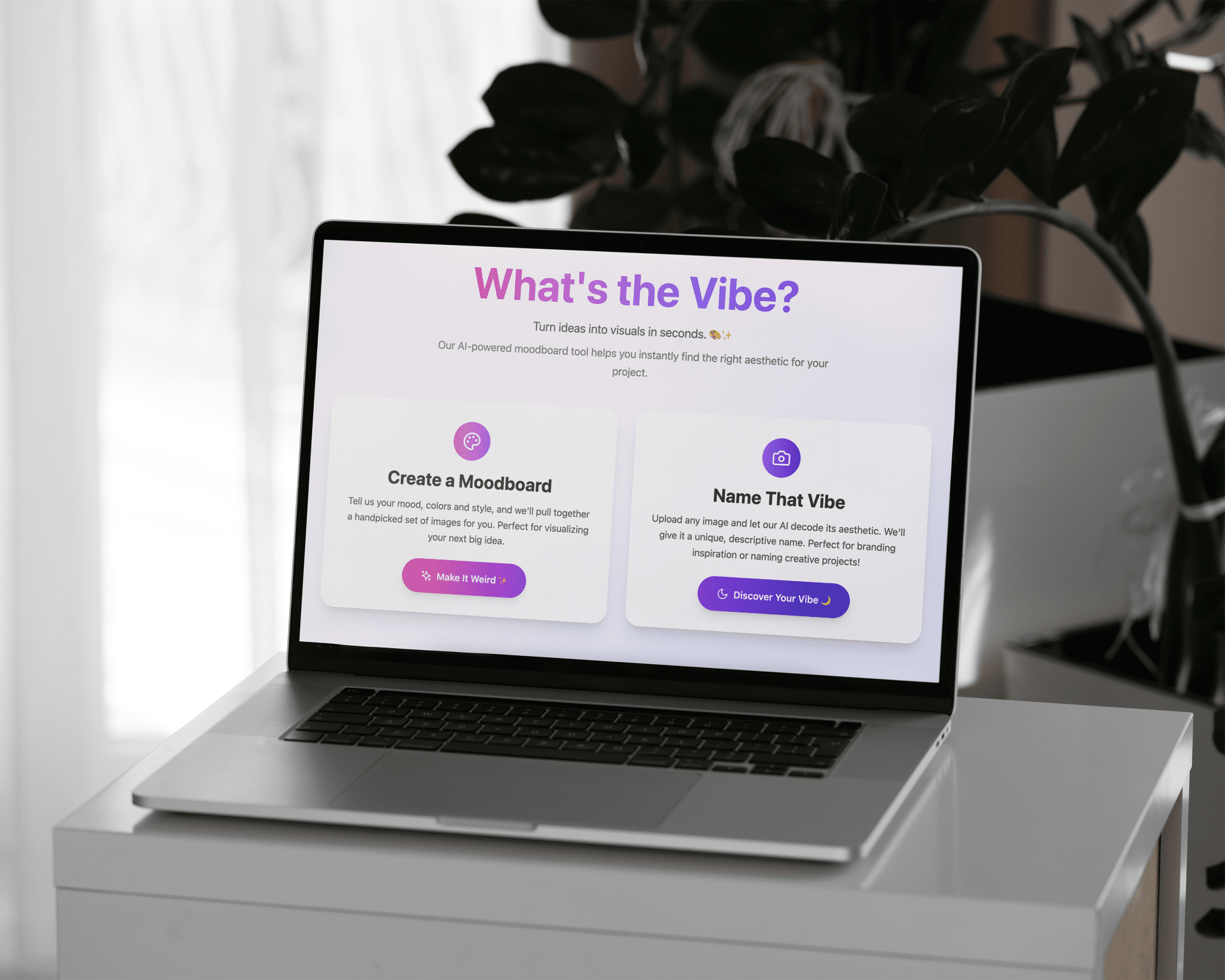
I built What’s the Vibe? to bridge the gap between creative imagination and actionable visuals.
It’s an AI-powered web app that:
Generates moodboards from your mood, color, and era inputs
Names the vibe of any uploaded image and provides a matching color palette
It supports four key creative contexts: Logo Design, Fashion, Interior Design, and Event Planning.
Problem
While redecorating my home, I saved dozens of inspo images but couldn’t name the style, which made it hard to search or shop in the same aesthetic. This gap between feeling and visual direction led me to create What’s the Vibe?.
Goal
Build a tool that transforms moods and colours into curated moodboards with colour palettes and can also “name the vibe” of any uploaded image to speed up ideation.
Target Audience
Anyone taking up creative projects, from home redecorating to party planning to brand ideas, who wants faster inspiration.
Context
This started as a fun side project. While redecorating, I noticed people posting photos on Reddit asking others “What is this style called?”
That gap between words and visuals sparked the idea: a tool that helps people map feelings, moods, and aesthetics into something they can name and expand on.
It was also my opportunity to experiment with AI-building tools. I used Bolt.New, which allowed me to quickly prototype, switch into message mode for explanations, and get just enough engineering help to make informed design choices.
Process
1. Ideation & Prototyping
I had two simple user goals:
Create a moodboard from keywords.
Find out what a visual aesthetic is called.
I sketched UI flows on paper and built an early clickable Bolt prototype to test the concept.
2. Search Logic Design
Moodboards are highly subjective. A branding designer and an event planner could both type “romantic” but expect completely different results.
To handle this, I designed 4 use case packs: Branding, Fashion, Interior design, Event planning. Each pack came with tailored keywords.
Challenges I faced:
1. Duplicate images
2. Unrelated results
3. Too few results
My solution:
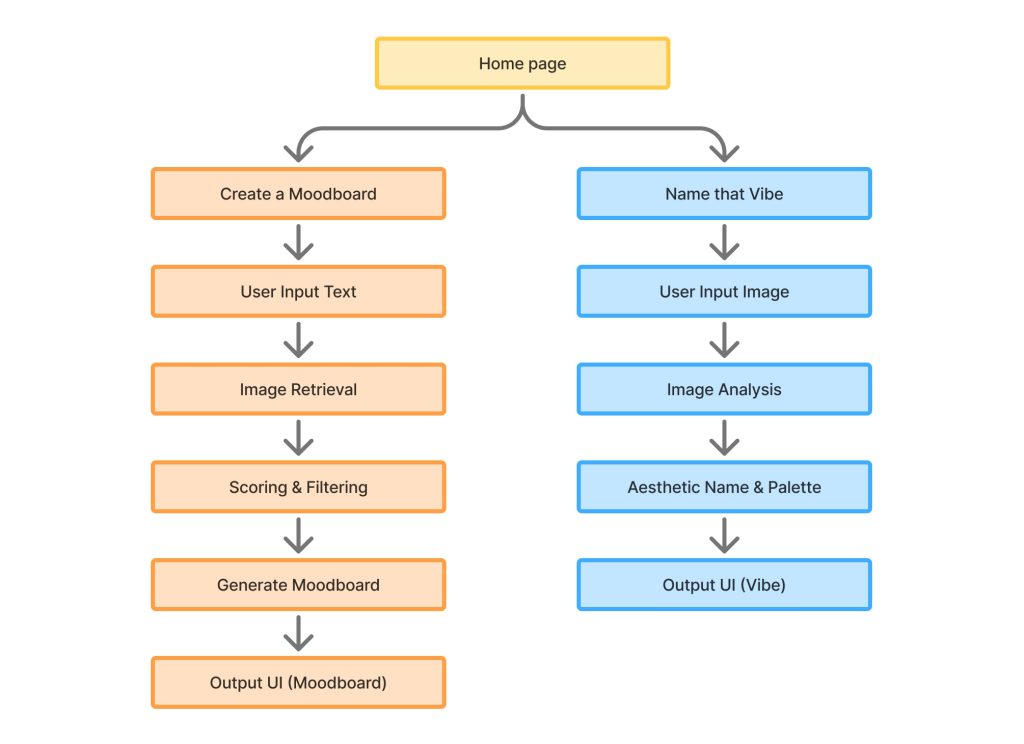
1. An 8-strategy query fallback system
2. Scoring and balancing to ensure variety
3. Guarantees of 4–6 results for every prompt
3. Colour Palette Extraction
Using the Color Thief API, I generated color palettes from moodboards while factoring in user input. This ensured the final palette both matched the board and respected the user’s desired color family.
4. UI & UX Refinement
I tested edge cases (“nostalgic dream, pink, gothic”) and incorporated user feedback:
- “I need more clarity on what the tool does.”
- “Colour inputs like browns/blacks aren’t handled well.”
- “I want to regenerate a new moodboard with the same input.”
- “What do I do after this?…I didn’t see the CTA”
- “Complimentary colours would be useful for branding.”
5. Testing & Iteration
- Dropdown for use cases → replaced with segmented vertical buttons for visibility and fewer clicks.
- Added input reminders above results to reduce cognitive effort.
- Supported keywords/colors that AI often missed.
- Tweaked responsiveness and polished layouts in Figma + React.
Key Features
Moodboard Generator: Turns words into curated visual boards.
Name That Vibe: Upload an image → get an aesthetic name + palette.
4 Use Case Packs: Branding, Fashion, Interiors, Events.
Smart Fallback Logic: Ensures no “no result” dead ends.
Color Palette Extraction: From images + user intent.
Error-resistant UI: Always returns something useful, never blank.
Outcome
A live, public tool that bridges words and visuals.
High engagement from early users who shared their boards.
Learned exactly where design + engineering + AI intersect to create real value.
Achievement
In just two weeks:
Took an idea → prototype → live tool.
Built complex query fallback logic.
Delivered a fast, creative experience for users.
What I Learned
-
-
-
How to prompt and code with AI, not just through it.
-
The limits of “one-tool-fits-all” solutions across creative disciplines.
-
The speed AI can bring to prototyping, but also the need for thoughtful human design. I was able to blend design thinking with engineering logic to create a tool that makes creativity faster and more accessible.
-
-
Future Scope
Customization: Allow users to refine or regenerate results with the same input.
Complimentary Colors: Add harmony suggestions for branding use cases.
More Packs: Explore fields like food styling, travel, or social media content.
Smarter Naming: Train the AI further to recognize aesthetics beyond color (e.g., contrast, texture, cultural cues).